

Not all stockouts are inventory shortages
Before blaming your distributor or assuming you under-ordered, check your stockroom. A significant share of retail stockouts happens when merchandise is physically present inside the building but has not been unpacked, priced, or moved forward to the sales shelf.
Short answer: the five distinct inventory states
When a customer cannot find an item, store teams often say 'we are out of stock.' In reality, inventory exists across five distinct operational states, and conflating them creates chaos in ordering and replenishment:
1. Shelf availability
Physical reality: Units physically sitting in front-facing sales positions, accessible and visible for customer purchase right now.
Operational risk: If empty, sales are lost immediately even if cases exist elsewhere in the store.
2. Backroom stock
Physical reality: Reserve cartons, overstock totes, or secondary displays physically present in the backroom, basement, or high risers.
Operational risk: Creates 'false stockouts' on the sales floor when staff fail to transfer goods forward.
3. System on-hand quantity
Physical reality: The recorded number of units shown in your inventory spreadsheet, register, or management app.
Operational risk: Discrepancies from theft, unrecorded breakage, or receiving typos cause phantom inventory, preventing reorders.
4. Purchase-order status (in transit)
Physical reality: Merchandise that has been ordered from a supplier, confirmed, or shipped, but has not yet arrived or been received into stock.
Operational risk: Reordering without checking open purchase orders causes costly duplicate shipments and cluttered storage.
5. Supplier availability
Physical reality: The upstream inventory level and fulfillment capacity of your distributor or manufacturer.
Operational risk: Vendor production shortages or backorders delay replenishments regardless of how early you submit orders.
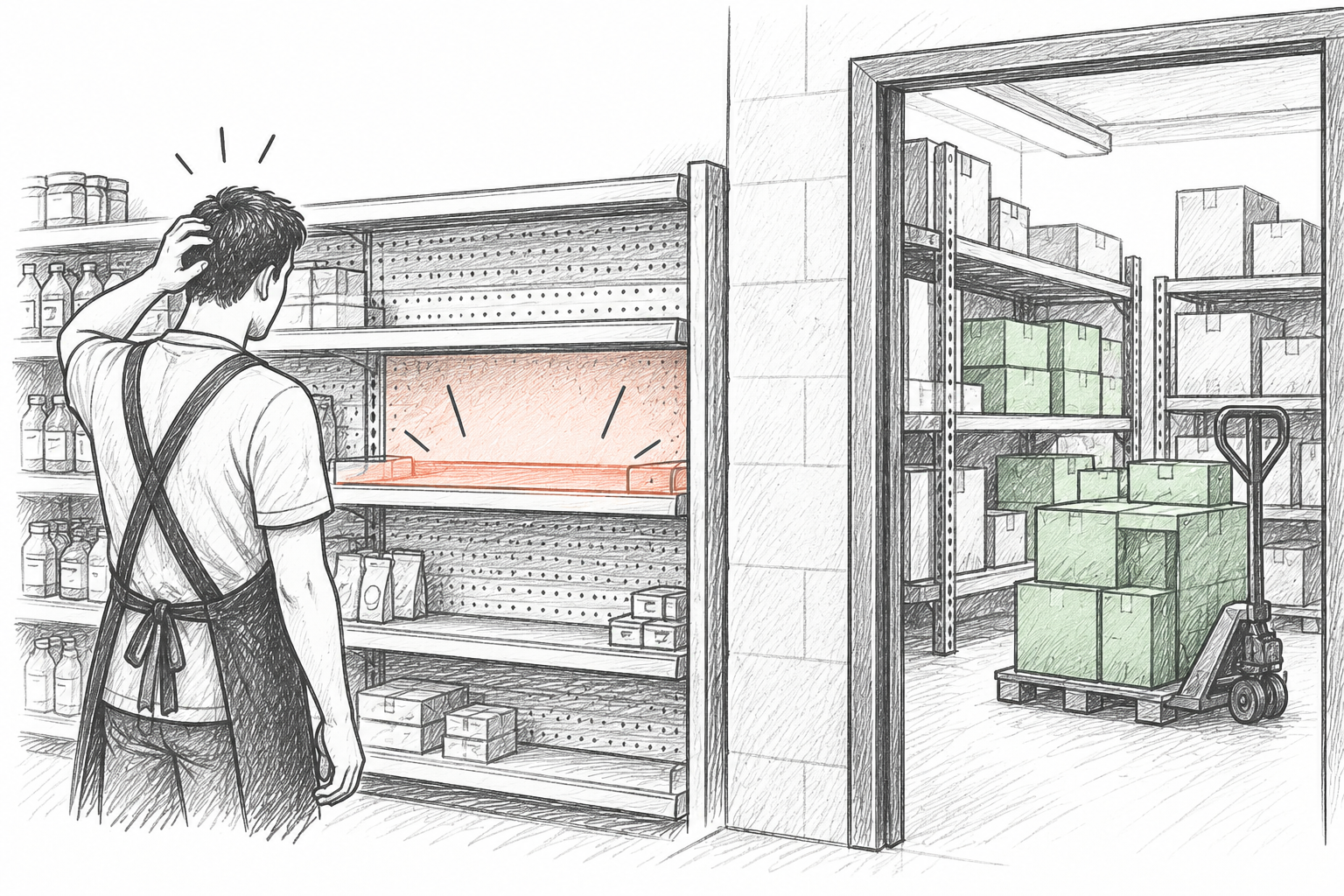
Shelf availability vs backroom availability: the front-floor breakdown
The most common and frustrating stockout occurs when a product is completely out of stock on the shelf, yet three cases are sitting undisturbed in the backroom. Shoppers cannot buy what they cannot see. Solving this operational gap requires disciplined daily routines rather than purchasing changes:
Schedule dedicated front-facing and restock sweeps
Assign specific morning or mid-afternoon windows for staff to walk aisles, pull merchandise from backroom shelving, and fill front facings before peak shopping hours.
Establish clear backroom bin locations
Organize reserve storage by category or aisle assignment so retail floor staff can find overstock in seconds rather than abandoning searches during busy shifts.
Flag shelf holes during daily floor walks
When an associate spots an empty shelf tag, verify whether reserve cartons exist in the backroom before submitting an emergency reorder to the distributor.
Maintain realistic shelf capacities
Ensure the shelf space allocated to fast-moving SKUs holds enough units to cover peak foot-traffic hours without running empty between daily restocks.
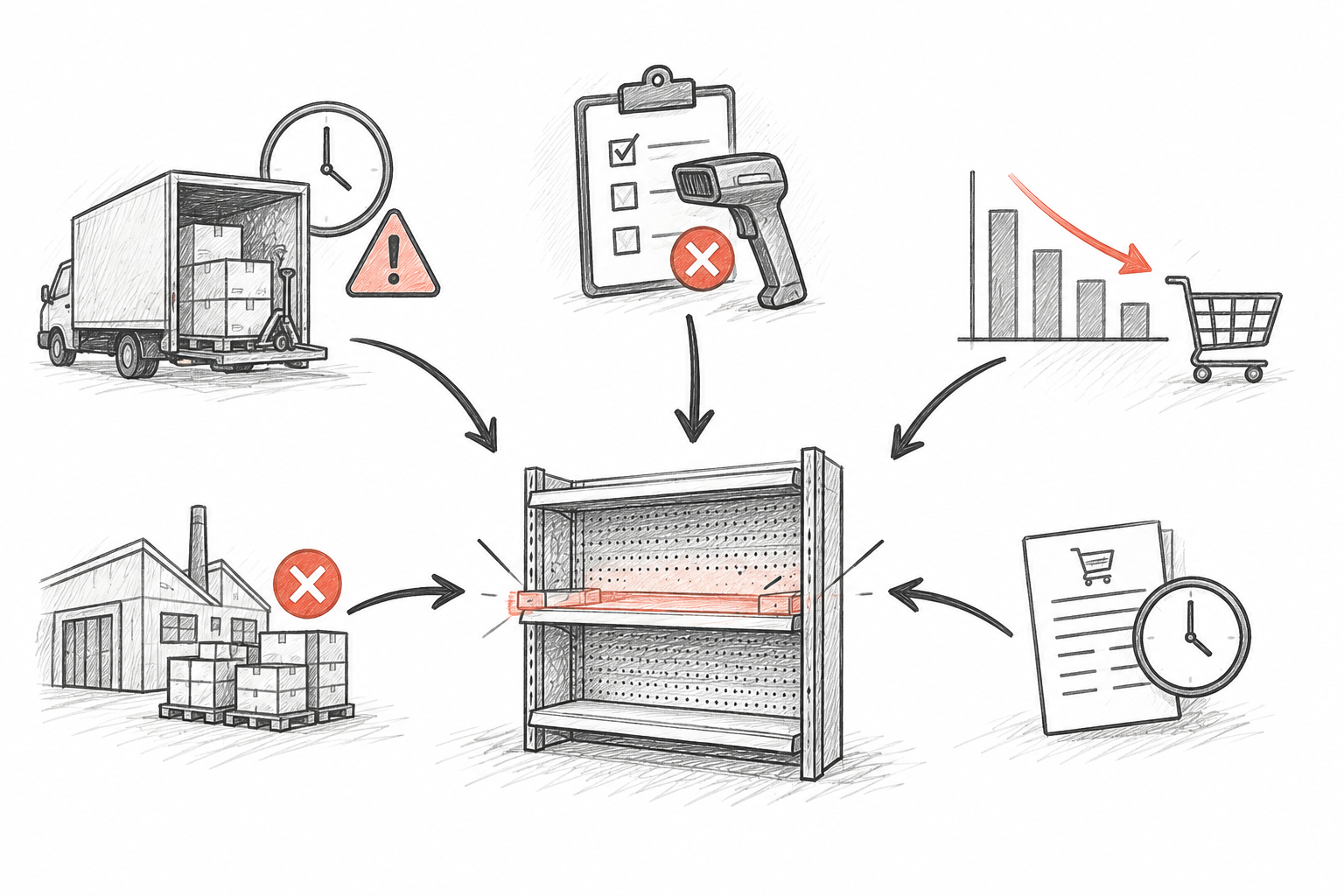
Root causes of retail stockouts: mapping the failure points
Retail stockouts rarely happen by pure accident; they follow specific failure paths across ordering, supplier logistics, and data hygiene. Identifying which path caused the outage directs you to the correct remedy:
Delayed order submission
The retailer waits until the shelf is nearly empty before placing a purchase order, leaving zero cushion for normal fulfillment lead time.
Operational fix: Establish calculated reorder points triggered by physical count thresholds instead of ordering by visual panic.
Supplier lead-time volatility
The vendor normally delivers in 3 days, but logistical backlogs, weather, or driver shortages stretch delivery to 7 days.
Operational fix: Incorporate retailer-defined safety buffers based on supplier delivery variability and monitor vendor on-time rates.
Phantom inventory from shrinkage or error
The system records 6 units on hand, but physical units were stolen, broken, or mis-scanned; the reorder trigger never fires.
Operational fix: Perform regular cycle counting on critical items and reconcile discrepancies promptly to reset on-hand numbers.
Distributor stockouts & partial shipments
The supplier receives your purchase order but is out of stock at their warehouse, short-shipping lines or placing items on backorder.
Operational fix: Inspect receiving documents immediately, maintain secondary backup suppliers for core staples, and confirm order acknowledgments.
Unanticipated demand surges
A sudden heatwave, neighborhood festival, or social media trend causes sales velocity to quadruple over 48 hours.
Operational fix: Track seasonal event calendars and temporarily adjust buffer stock for high-sensitivity categories ahead of known rushes.
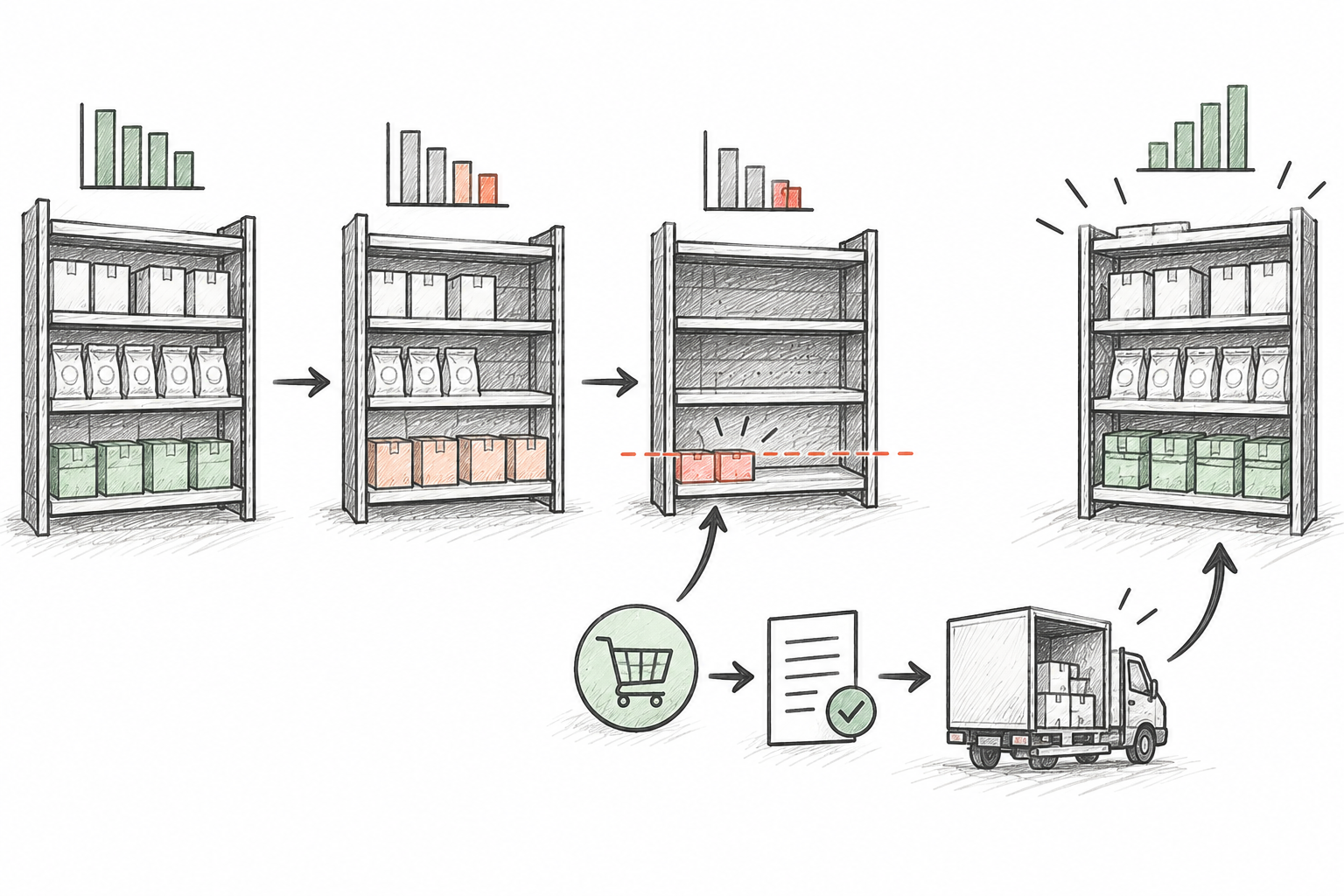
Supplier lead time and calculating practical reorder points
Waiting until a product is low before ordering is a gamble. A reorder point establishes a clear mathematical threshold: when stock drops to this level, submit a purchase order immediately so new stock arrives just as remaining stock depletes.
Demand during lead time is average daily sales multiplied by the supplier lead time in days. The retailer buffer (safety stock) is an extra cushion chosen by the store owner to absorb minor delivery delays or occasional sales spikes.
Average Daily Sales: Average daily sales = 4 units per day
Supplier Lead Time: Supplier lead time = 5 business days
Demand During Lead Time: Expected demand during lead time = 4 × 5 = 20 units
Safety Buffer: Store buffer cushion = 8 units
Calculated Reorder Point: Calculated Reorder Point = 20 + 8 = 28 units
Illustrative example only. When total available inventory reaches 28 units, a new order must be placed. Ordering later will cause a stockout before the 5-day delivery arrives.
Accounting for open purchase orders: effective inventory balance
A frequent mistake made by retail floor staff is placing an order whenever shelf stock looks low, without checking whether an order is already in transit. This leads to cash flow congestion and overcrowded backrooms.
Shelf Count: Count on shelf: 6 bottles
Backroom Count: Count in backroom: 0 bottles
Open Purchase Orders: Open purchase order in transit: 24 bottles (placed 2 days ago, arriving tomorrow)
Effective Inventory: Effective inventory = 6 + 0 + 24 = 30 bottles (above reorder point of 28)
Replenishment Decision: Action: Do not place another order. Reordering today would result in 54 bottles arriving, tying up cash and exceeding shelf capacity.
Phantom inventory: how counting errors quietly trigger stockouts
Phantom inventory (or ghost inventory) occurs when your records show merchandise in stock that does not physically exist in the building. Because your system believes you have units, no reorder alert triggers, and the shelf sits bare indefinitely until someone notices.
Unrecorded theft or shoplifting
Items taken from shelves remain on digital books. The computer thinks you have 5 items; customers see zero. The reorder point is never tripped.
Receiving shortcuts and invoice blind-signing
Staff signs for 10 cartons when the supplier only unloaded 8. The system records 10, leaving a permanent 2-unit phantom gap that delays future orders.
Unlogged customer returns and damages
Broken, unsellable bottles tossed in the trash without entering a scrap adjustment remain active on system records as sellable inventory.
Barcode mismatches and cross-scans
A cashier scans vanilla yogurt twice for a customer buying one vanilla and one strawberry. Strawberry is physically gone but strawberry records show stock, while vanilla records show an artificial shortage.
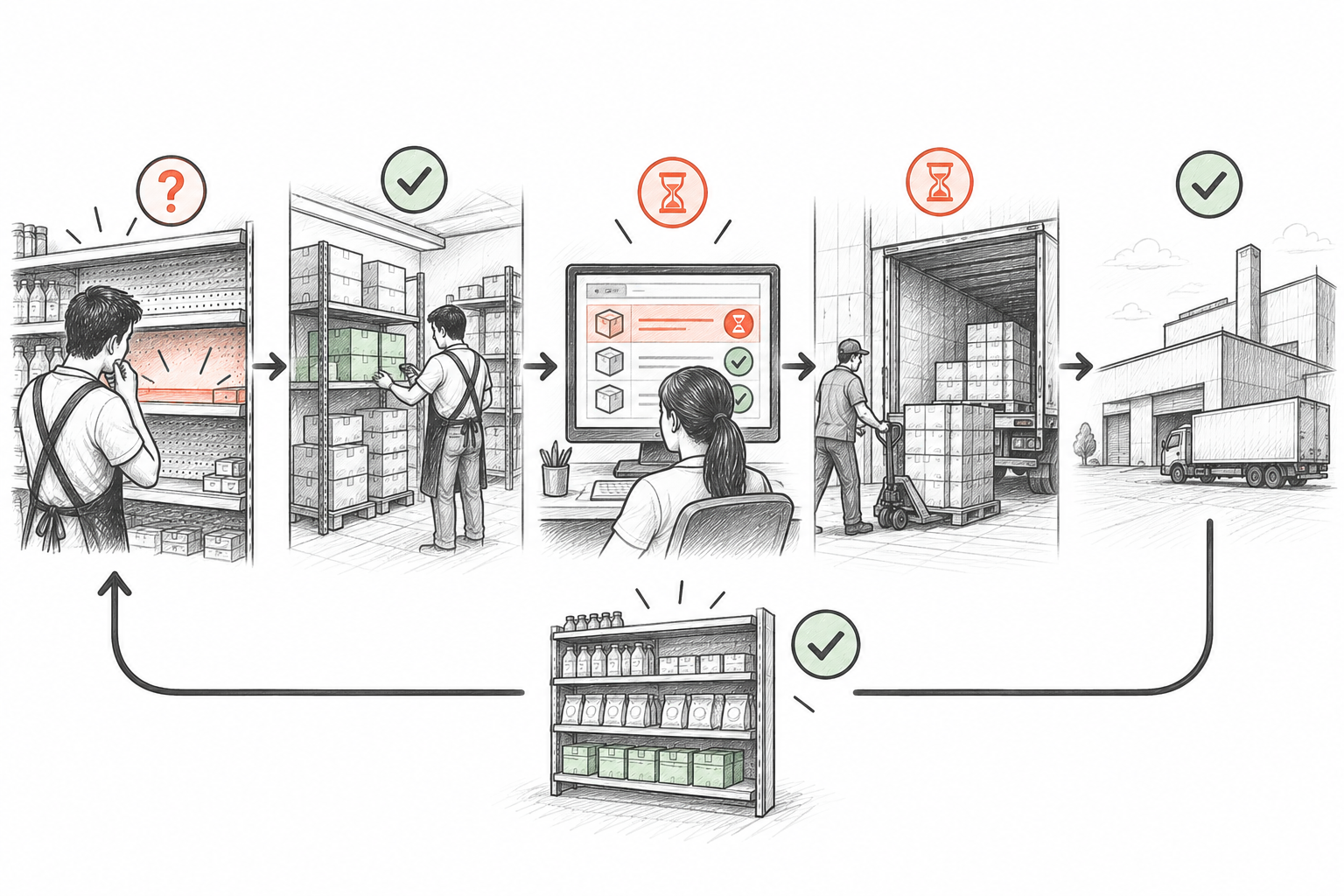
Investigating stockouts step-by-step: the store audit workflow
When you encounter an empty shelf space, follow a systematic audit workflow to isolate the root cause before taking corrective action:
Step 1: Check backroom and secondary display locations
Search stockroom shelves, top risers, checkout impulse bins, and endcaps. If found, restock the shelf immediately.
Step 2: Inspect the system on-hand balance
Look up the SKU. If the system shows positive stock but the store is physically empty, you have phantom inventory. Investigate recent sales, receiving, and shrinkage, then correct the count balance.
Step 3: Review open purchase orders and receiving logs
Check whether an order was placed. If an open PO exists, verify estimated delivery dates with the vendor or carrier tracking.
Step 4: Contact supplier regarding fulfillment status
If an expected delivery is overdue, contact the distributor rep to confirm if the item was backordered, short-shipped, or discontinued.
Step 5: Adjust reorder parameters or buffer stock
If the stockout was caused by higher sales velocity or longer vendor lead times, update the SKU's reorder point and minimum buffer.
Supplier communication and managing lead-time variability
Even the best internal calculations fail if suppliers deliver unpredictably. Protecting your store against stockouts requires active vendor relationship management:
Demand prompt order acknowledgments
Require distributors to confirm line availability and expected delivery dates within 24 hours of receiving your purchase order, rather than discovering shortages on delivery day.
Track vendor on-time and in-full (OTIF) rates
Note suppliers who regularly deliver late or short-ship cases. For erratic vendors, either increase buffer inventory or identify alternative secondary suppliers.
Communicate upcoming sales promotions early
Alert distributors several weeks in advance if you plan large seasonal promotions, marketing campaigns, or community events that will spike order quantities.
Set agreed cut-off times for reorders
Understand exact vendor order cut-offs (e.g. Tuesday by 2:00 PM for Thursday delivery) so your store never misses a weekly delivery window.
Safety stock sizing: building buffers without arbitrary rules
A common retail mistake is applying a blanket safety stock rule (such as 'always keep 20% extra' or 'hold two weeks of everything') across the entire catalog. Arbitrary buffers overstock slow goods and under-protect bestsellers. Instead, size buffers by evaluating specific operational risks:
Sales velocity & revenue impact
High-velocity bread-and-butter items that generate steady daily margin warrant robust buffers; losing sales on core staples alienates regular customers.
Supplier reliability & delivery lead time
Suppliers with erratic delivery schedules or long shipping transit times require larger safety buffers than dependable local distributors who deliver daily.
Product perishability & shelf life
Fresh dairy, produce, and baked goods cannot sustain large safety buffers without incurring severe spoilage; buffers must be lean and replenished frequently.
Supplier minimum order quantities (MOQ) & case packs
If a supplier only ships in 24-unit master cartons, receiving a case automatically creates a temporary built-in buffer until sales work down the inventory.
How Retail Scan & Stock helps prevent retail stockouts
Retail Scan & Stock equips independent retailers with fast, dependable floor tools to catch replenishment gaps and draft accurate purchase orders before stockouts occur:
Rapid mobile barcode verification:
Scan shelf tags on iOS or Android to immediately verify recorded quantities against physical shelf stock, instantly exposing phantom inventory.
On-floor purchase order generation:
Draft clean vendor purchase orders right from the aisle as you spot low stock, eliminating forgotten orders and delayed submissions.
Local-first offline reliability:
Conduct stock counts and build orders inside walk-in coolers, basements, or remote storage rooms without worrying about cellular drops or Wi-Fi dead zones.
Clean document & spreadsheet exports:
Export stock audits and purchase order records into standard CSV and Excel formats to share with distributors or import into back-office systems.
Product Plan Boundaries: The Free plan includes 1,000 SKUs, 5 documents, 30 days of history, 1 supplier, 1 device, no cloud sync, and is free forever. The Paid plan adds multi-device cloud synchronization. Retail Scan & Stock provides manual mobile barcode scanning, count sessions, and purchase order drafting; it does not offer automated AI demand forecasting, automated reorder triggers, or direct electronic supplier integration.
Frequently Asked Questions
Why does a product go out of stock when the computer says we have units?▾
This is called phantom inventory. It happens when items were stolen, broken without being written off, miscounted during receiving, or cross-scanned at checkout under another barcode. Regular physical cycle counts are the only way to reset recorded stock to physical reality.
What is the difference between shelf availability and backroom stock?▾
Shelf availability measures units on the sales floor ready for shoppers to purchase. Backroom stock is reserve inventory stored in stockrooms or top shelves. A store can have full backrooms while suffering front-floor stockouts if restocking schedules are neglected.
How do open purchase orders prevent over-ordering?▾
Effective inventory includes units on hand plus units already ordered from suppliers (open POs). If staff reorders based only on an empty shelf without checking in-transit purchase orders, duplicate shipments will arrive, wasting working capital and overcrowding storage.
Is there a universal safety stock formula for all small retail stores?▾
No. Universal formulas and fixed percentages do not account for wide variations in supplier lead times, delivery reliability, item shelf life, and sales volatility. Retailers must tailor buffer levels to individual supplier consistency and SKU velocity.
How often should retail store managers check for low stock?▾
Fast-moving staples should be visually audited daily during morning or evening shelf sweeps. High-value and velocity SKUs should undergo regular weekly cycle counts, while slower-moving merchandise can be audited on bi-weekly or monthly counting schedules.
Does Retail Scan & Stock automatically submit orders when items run out?▾
No. Retail Scan & Stock does not automatically generate or dispatch orders. It provides fast mobile barcode tools for store owners to conduct accurate physical counts, verify stock, and manually draft structured purchase orders on their mobile devices.
Related operational guides and resources
- → Reorder Point vs Par Level vs Safety Stock: A Simple Guide for Small Retailers
- → How to Receive Inventory From Suppliers Without Stock Errors
- → How to Reduce Inventory Counting Errors in a Retail Store
- → How Often Should a Small Store Count Inventory?
- → From Stock Count to Purchase Order: Small Store Workflow
- → Inventory Shrinkage in Small Retail: Causes and Practical Controls